Using the Interface
Sidebar panels, header lookup, map toolbar, and common map actions in modern QSmap.
QSmap’s current interface is a React app inside NetSuite. Layout differs from older screenshots in legacy help articles: expect a left sidebar of panels, a header search, and map toolbar controls on or near the map.
Sidebar panels
Open panels from the left navigation (visibility can be limited by preferences and license). Use the ? in each panel header to open that panel’s documentation.
| Panel | Purpose | Docs |
|---|---|---|
| Main Search | Entity filters, products, clustering, and search history | Main Search |
| Favorites | Favorite entities and locations | Favorites and Locations |
| Saved Search | NetSuite saved searches as map layers | Saved Search |
| Saved Regions | Drawn polygons/circles you save and reuse | Saved Regions |
| Saved Locations | Bookmarked map points (including address add) | Favorites and Locations |
| Employees | Employee pins (when enabled for your account) | Employees |
| Exports | CSV export jobs and preview | Exports |
| Agenda | Calendar, Plan my day, Fill the Hour | Agenda |
| Segments | Geographic segments (typically Premium) | Segments |
| AI Insights | AI territory analysis (when configured) | AI Insights |
| Marker Styles | Custom pin styles and rules (permissions vary) | Marker Styles |
Header lookup
Use the segmented header search for Name, Address, or Location lookup. This replaces the older dedicated Quick Search drawer. See Header Lookup.
Map toolbar (common actions)
Exact icons vary by license and preferences. Typical controls include:
- Draw shapes — polygons and circles for regions / filters
- Fit / zoom to results — frame returned markers
- Clustering — including force-cluster after you zoom past your max cluster zoom
- Labels — show or hide marker labels
- Home / work markers — drop pins at saved home and work locations (set in Options)
- Marker accuracy — filter by geocode quality (see Marker Accuracy)
Drawing tools were rebuilt in recent releases. If you used older drawing buttons, look for drawing controls on or near the map rather than in the legacy left drawer menu.
Marker interactions
- Open a pin for record details and links back into NetSuite.
- Hide pins from your personal view when you need to declutter (does not affect teammates). See Hide Pins and Privacy.
- Correct locations with the geocode results picker when multiple candidates exist; the picker shows which result is currently on the map.
Info and help
- Info in the header opens in-app release notes, version, and build details.
- ? in the header opens the QSmap documentation home.
- ? in a sidebar panel header opens that panel’s docs page (for example Segments).
- For tickets and account support, use support.qsmap.net or email support@qsmap.net.
Related
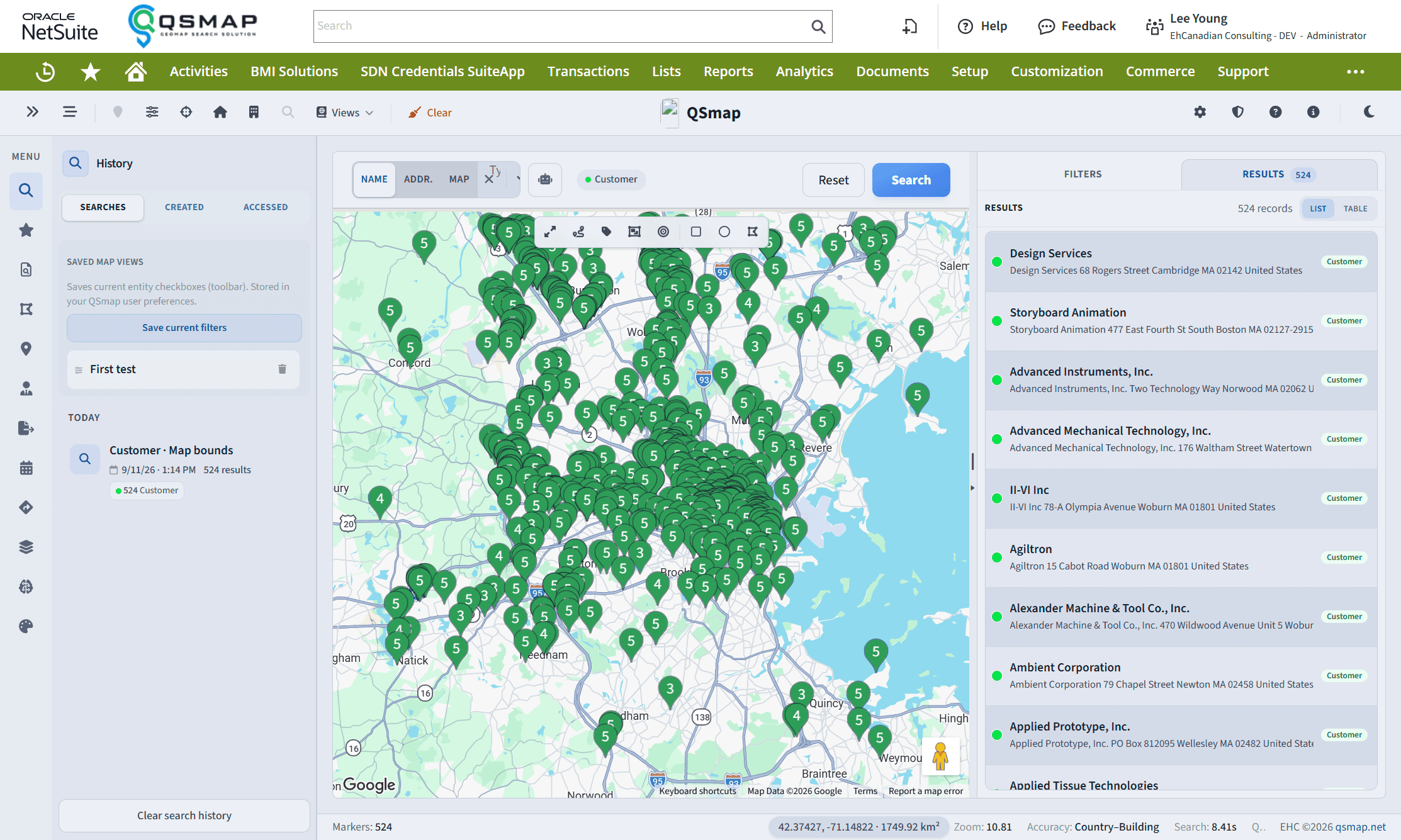
Current React UI inside NetSuite with live map results.