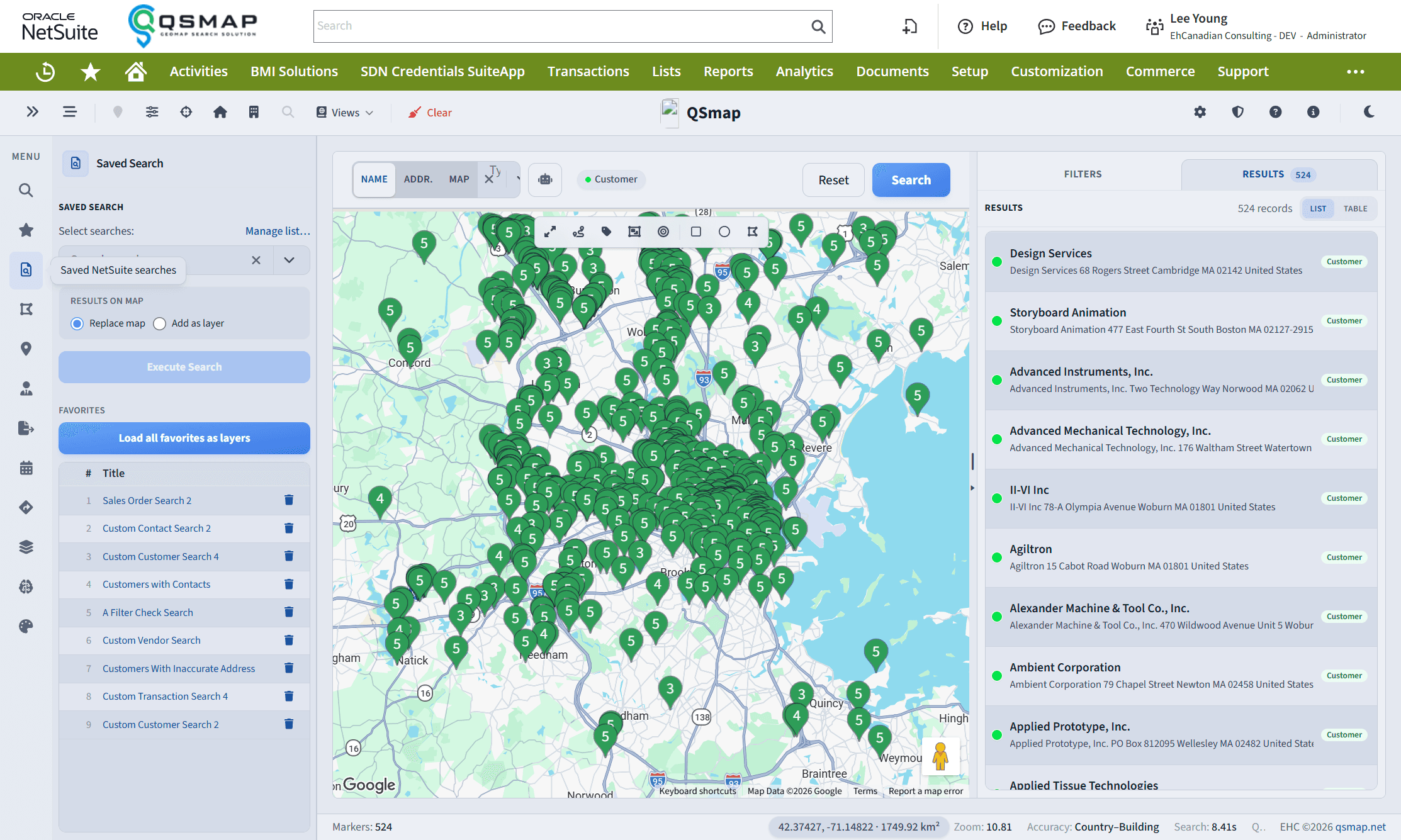
Saved Search
Run NetSuite saved searches on the map, including multi-layer color layers.
The Saved Search panel loads Customer, Contact, Vendor, Partner (and related) NetSuite saved searches as map markers. Use it when you already maintain filters in NetSuite and want those same criteria on the map.
Basics
- Open Saved Search in the sidebar.
- Choose a public or private saved search available to your role.
- Run it to plot matching entities.
Favorite frequently used searches when that control is available so they stay easy to find.
Multi-layer saved searches
You can run several saved searches at once, each as a distinct color layer. Turn layers on or off to compare segments, stages, or territories side by side without swapping searches.
Layer controls and heatmap options depend on your license. If you do not see multi-layer or heatmap features, ask your administrator about plan entitlements.
Transaction / pipeline context
For transaction-oriented searches (for example opportunities), markers may show pipeline stage, probability, projected total, and expected close date when the underlying saved search returns those columns.
Tips
- Keep NetSuite saved search definitions lean and well named—QSmap inherits their filters and columns.
- Combine layers with Saved Regions to focus on a geography while comparing pipeline stages.
Related